I’ve tried changing code even printing the file bytes contents still shows file is empty.
Here are my logs:
[tester::#JZ6] Running tests for Stage #JZ6 (RDB Persistence - Read a key)
[tester::#JZ6] Created RDB file with a single key: ["banana"]
[tester::#JZ6] $ ./your_program.sh --dir /tmp/rdbfiles4247079374 --dbfilename blueberry.rdb
[your_program] Opening file: /tmp/rdbfiles4247079374/blueberry.rdb
[your_program] File bytes:
[your_program] Failed to open database:  file is too small:
[your_program] Server started on port 6379
[tester::#JZ6] client: $ redis-cli KEYS *
[your_program] Client connected:  [::1]:59688
[tester::#JZ6] Expected command to be "banana", got "strawberry"
[tester::#JZ6] Test failed (try setting 'debug: true' in your codecrafters.yml to see more details)
And here’s a snippet of my code:
func Open(dir string, dbfilename string) (metadata map[string]string, databases map[uint8]resp.Database, err error) {
	if dir == "" {
		dir = "./"
	}
	if dbfilename == "" {
		dbfilename = "dump.rdb"
	}

	filePath := filepath.Join(dir, dbfilename)
	fmt.Printf("Opening file: %v\n", filePath)
	if _, err := os.Stat(filePath); os.IsNotExist(err) {
		return nil, nil, fmt.Errorf("file does not exist: %v", filePath)
	}
	file, err := os.Open(filePath)
	if err != nil {
		return nil, nil, fmt.Errorf("error opening file: %v", err)
	}
	defer file.Close()

	fileBytes, err := io.ReadAll(file)
	if err != nil {
		return nil, nil, fmt.Errorf("error reading file: %v", err)
	}
	fmt.Printf("File bytes: % X\n", fileBytes)

	if len(fileBytes) < 8 {
		return nil, nil, fmt.Errorf("file is too small: % X", fileBytes)
	}
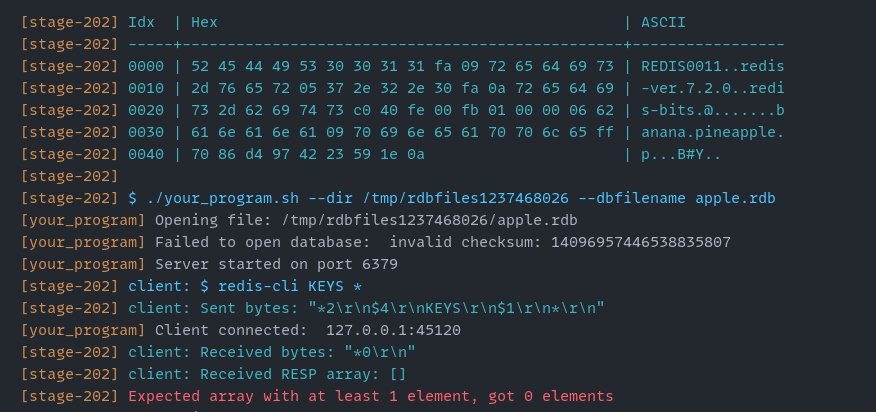
My guess would be that the problem is most likely not related to the RDB content (used the tester to check the file content, and it is creating the file correctly!), but due to the fact that your server should kill itself and shutdown gracefully on receiving SIGTERM (CTRL + C). Here are the tester logs that show the same (as you can see at the end of stage 201).
If your server does not shutdown gracefully in such a situation, then when the tests are run in quick succession, it is possible that the processes for the different tests try to share the same resources (ports, directories, files), and thus you get this error. Even in the case of a single test, this can point to some incorrect synchronisation or improperly managed resources (goroutines), that may be causing the data race.
If the dir and dbfilename are provided, you are just supposed to try to access them and not create the directories and the file, cause in the process you end up overwriting them and their content, and thus you get the no bytes in the file error.
After commenting out the same, the content is read correctly, and now the error changes: